I built a marketing system: it analyzes, recommends and sells. Here's how it works
How I moved all of my marketing planning, analysis, content production and scheduling under Claude. The platform, the database and the content factory, with diagrams and dashboard screenshots.
In the AI era, tools have recently become available that look less spectacular at first, but are all the more effective and genuinely useful.
And I don’t mean asking ChatGPT for, say, 10 ideas that will make you a billionaire. There’s plenty of that already: roughly half of new online articles are now AI-generated, and the feeds are full of it too.
Anyway, long gone are the days when I stitched together hand-built excel sheets and designed every single screen of a new website on fifty-artboard Figma boards, so that a developer could then somehow weld it together for me on a wordpress site at 60% efficiency.
Then there are the PPC creatives, the social media calendar in google sheets, and the handful of subscription tools for scheduling posts and analysing things.
Well, I was always fed up with all of that, even though I diligently tried to maintain and optimise the system and update it whenever something changed on a platform. But at some point it became obvious that I had turned into one of those eternal gear acquisition syndrome gaming PC builders who always need to add just one more part to the setup to make it perfect, but by the time it’s in, the whole system is outdated.
At the same time, over the past 3 years I’ve been able to build so many useful things with Claude that I set myself a challenge: what if I moved all of my marketing planning, analysis, content production and scheduling under Claude? Of course I knew it would take quite a few connectors, MCPs, custom API setups, a github repo, a pile of my own skills, and above all a complete, overarching strategy with my own recipe book that defines exactly what the end result should be.
I set three ground rules:
- All content is made from a relevant, up-to-date database.
- The system can analyse, produce and schedule automatically.
- No external system has to be operated by hand.
The platform
I’ve been using Claude for almost everything for years, and a very stable MCP ecosystem has been built around it. So using that big liar ChatGPT, or Gemini, which for now just isn’t up to tasks like this, never even came up. Simply put, MCP is a connector. Through it, Claude doesn’t just talk to me, it can see into my webshop, my ads and my task lists, and if I let it, it works in them too.
The whole system in one picture looks like this:
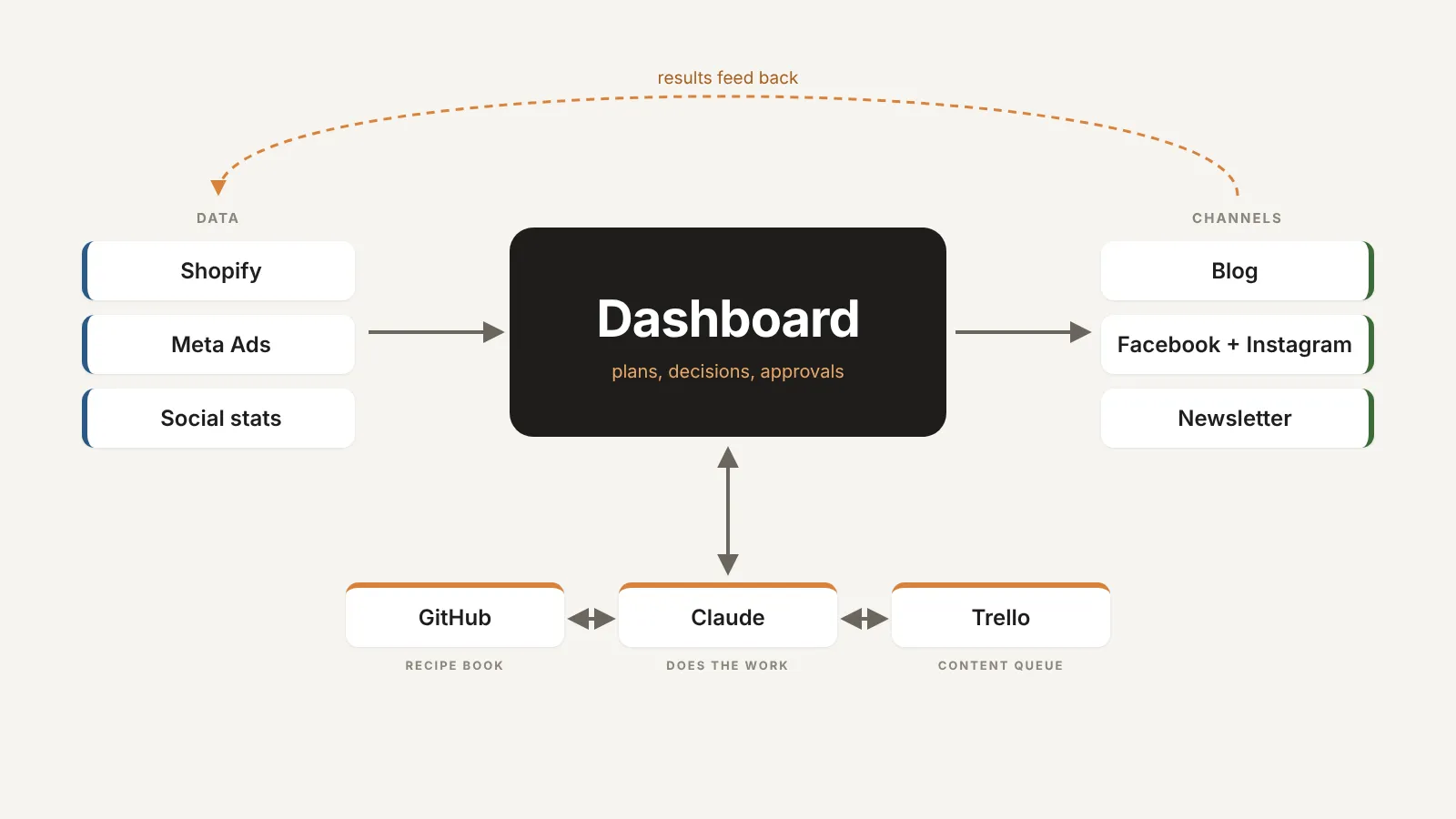
Claude works for me in three ways:
- In chat, when I have a question or need something quickly. “Write an article about Megamass”, “can the post go out now”, “check what worked well this week”. That’s it.
- As Claude Code in the cloud, on a schedule. These tasks run on their own every morning. They write the daily blog post, prepare the social posts, make a report every Monday and a plan every month. My computer doesn’t even need to be on.
- As an artifact, which is a small website of its own inside Claude. That became the dashboard, the centre of the system. This is where I see the monthly plan and the suggestions, and approve or reject them with one tap. Feri and I use it together, and it works the same on mobile as on desktop.
The monthly plan view of the dashboard, for example, looks like this:
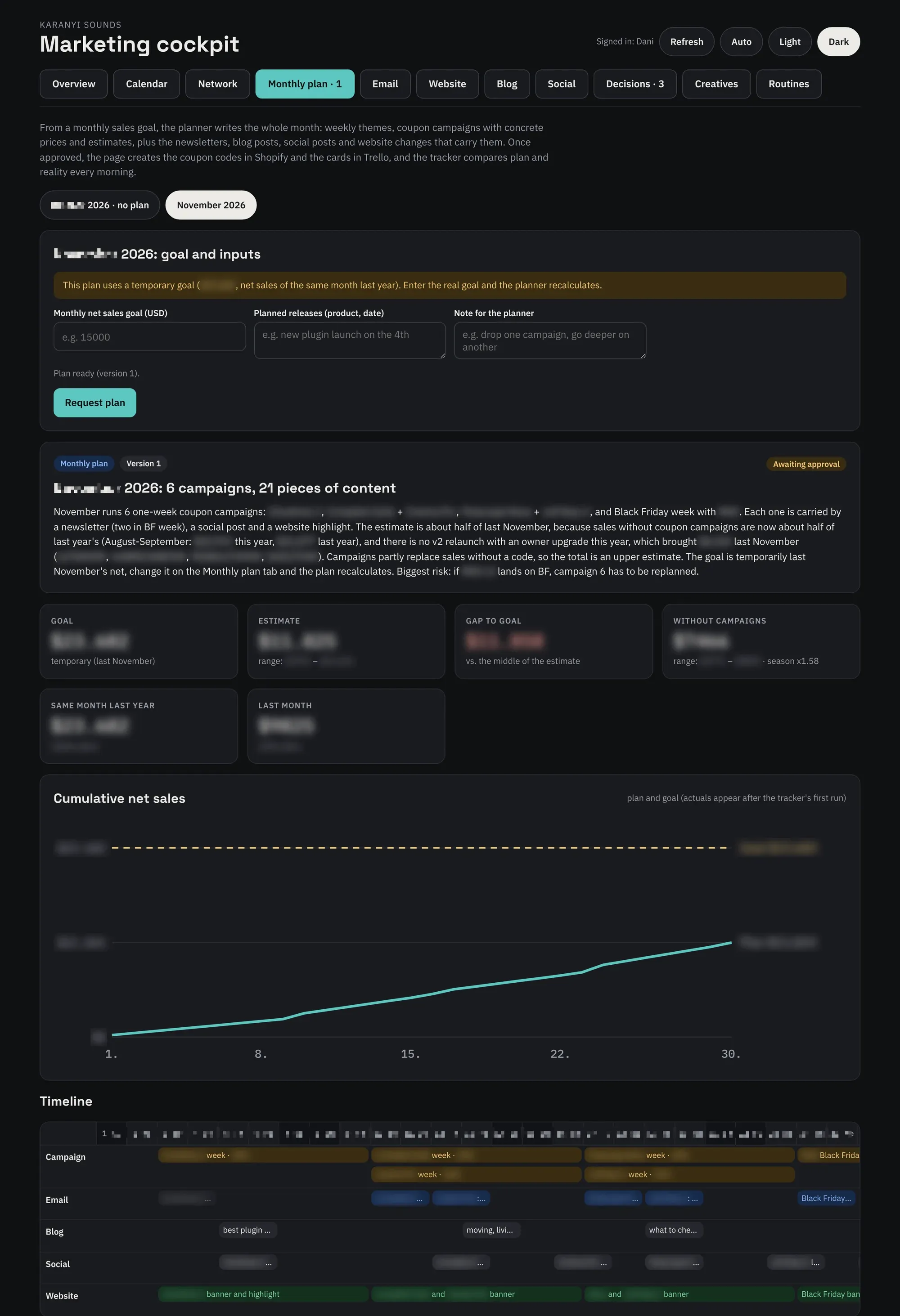
I set the monthly sales goal, and the planner writes the whole month: coupon campaigns, newsletters, blog posts, social posts and website changes, laid out on a timeline. Once I approve it, the coupon codes and Trello cards are created automatically. I’ve hidden product names, amounts, codes and discounts.
Through the connectors, Claude has access to:
- Shopify: products, prices, sales, visitors. This is also where the blog posts go out.
- Meta Ads: how much we spent and what brought real purchases.
- Scheduling Facebook and Instagram posts, and their statistics.
- Newsletters.
- Trello: this is the content queue. Every article, post and newsletter is a card, and I approve it or ask for changes by moving the card. It stayed in Trello on purpose: I open it every day anyway, so I didn’t need yet another interface.
All that was left was to add a github repo that holds my recipe book. It contains every skill and every custom definition and setting that matters to me, which make the system produce content that fits my character and taste instead of something generic. It says who we are, how we talk, and which words we never use. It also has the honesty rules: no made-up features, prices or quotes. There is a guide for each channel, and there are the skills that describe each task step by step. Every morning run starts with this. If I want something done differently, I don’t explain it again every time, I rewrite the recipe once.
I also built my own content management interface. This is where I store images and videos, and where the generated content ends up too. Dropbox costs money, the versions would have filled it in no time, and I didn’t want yet another interface I’d never open anyway, since I control everything from code or from chat. So I put an open-source content management system on Cloudflare.
The end result: there isn’t a single interface in it that I have to open just to keep the system running.
Relevant content: the database
Once the strategy was in place, all that was left was to build the personal memory.
Relevant data for a good marketing system can come from many places: your own spreadsheets, emails, your product descriptions, among other things the code and copy of your website, even transcripts of meetings. Think of this as memory. This is how the system knows who we are, what we sell, and to whom and how we speak.
But memory alone doesn’t get you far if there are no memories. The memories give the system its real depth. The basic data all matters, but it’s worth almost nothing unless it’s paired with historical data and is absolutely fresh.
For us, these are:
- sales data going back years, accurate to the minute, in full depth,
- the content and all the results of the newsletters we’ve sent,
- the full history of our PPC ads,
- Google Analytics and Microsoft Clarity data,
- the raw codebase of some of our products,
- transcripts of production and strategy meetings made with an AI note-taker.
Memory and memories fit together like this:
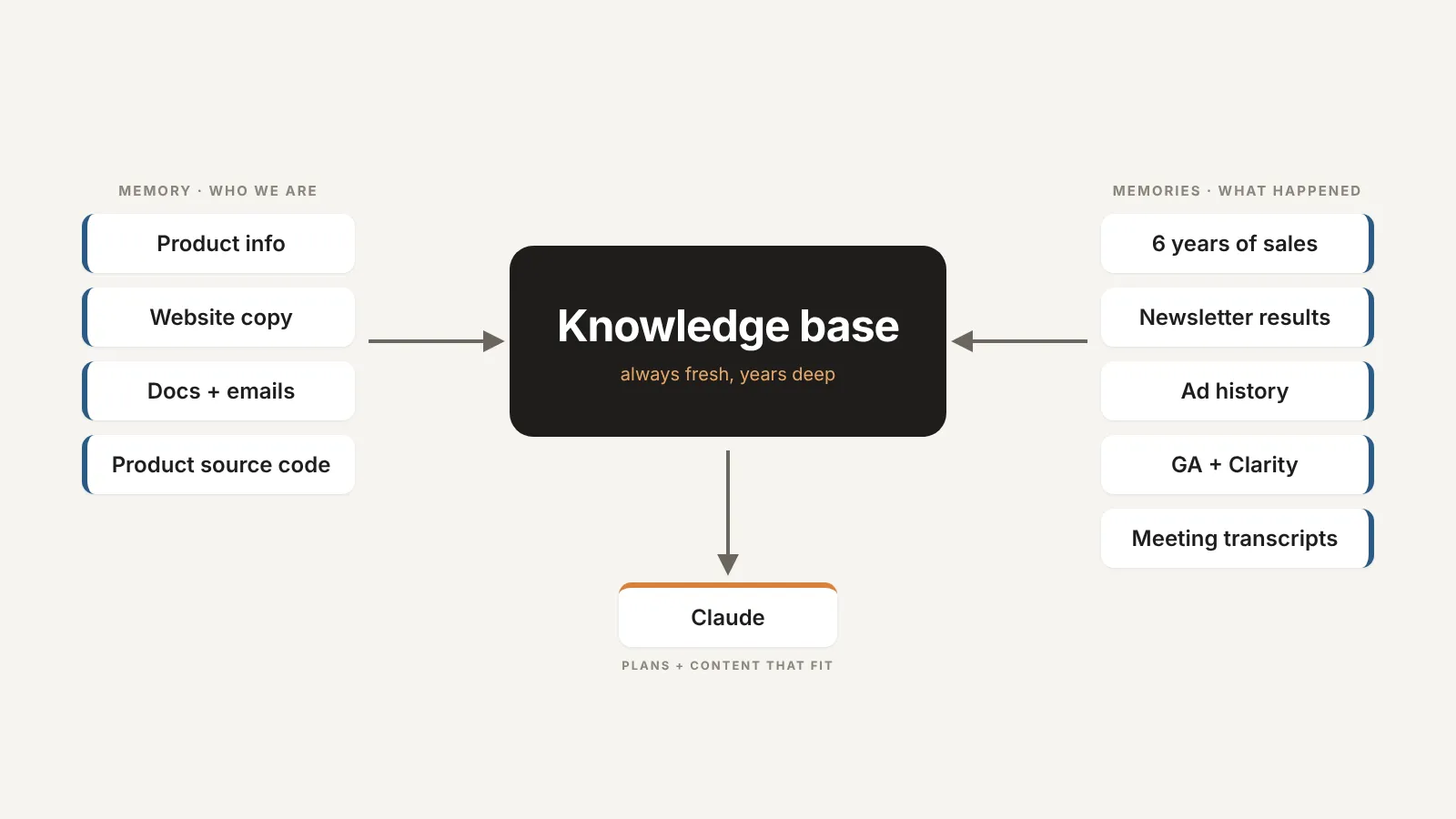
Freshness is a core criterion here. That’s why the system doesn’t work from static spreadsheets uploaded once. On every run it reads the numbers live from the webshop, the ad account and the other sources. What happened last night is already in this morning’s plan.
From this, the weekly report doesn’t just show numbers, it makes proposals. The decision cards look like this:
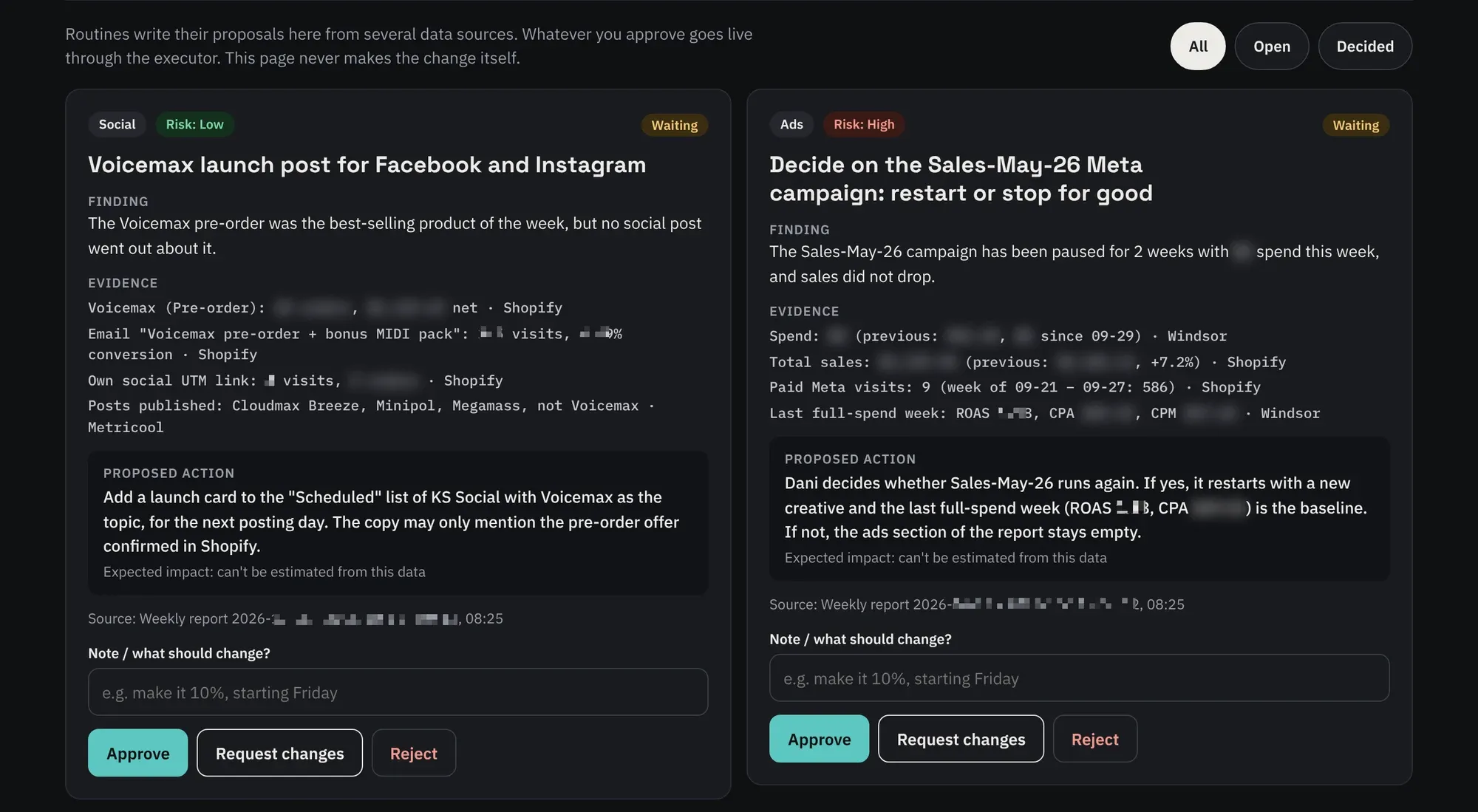
Every card has the finding, the evidence with its source and the exact action. All I have to do is approve, ask for changes or reject.
Put together, this is the kind of database with which a precise AI system achieves results that often surprise even me. It also sees what connects to what. For a newsletter idea, for example, like this:
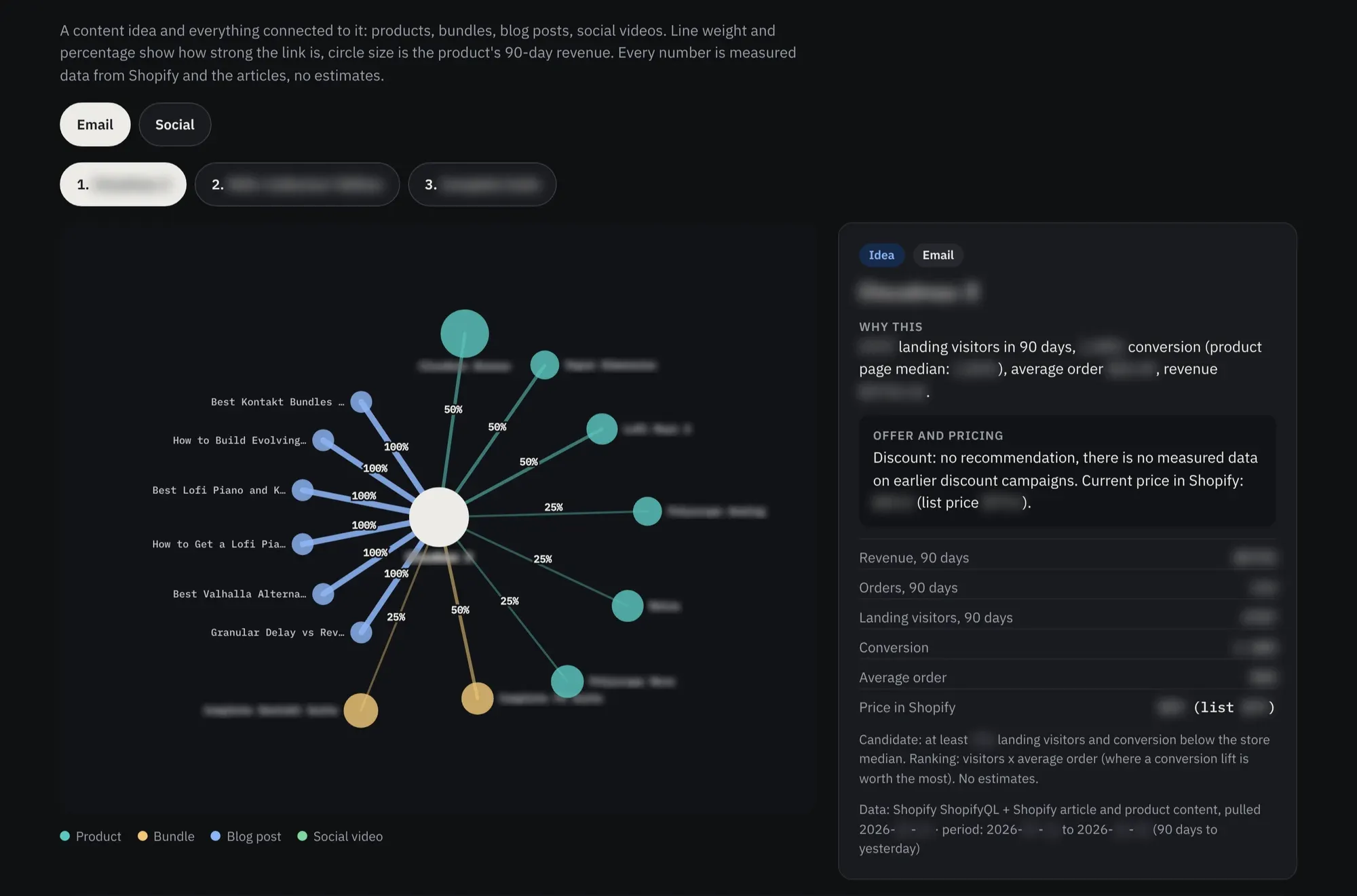
The Network view: products, bundles and blog posts around one idea. Line weight is the strength of the link, circle size is the product’s revenue. Every number is measured data from the webshop and the articles, no estimates.
The content factory
OK, but how does all of this turn into a clickable insta reel? Content doesn’t write itself. Or if it does… well, it looks like it. The web is full of AI slop, because for some strange reason everyone imagines that nobody but them is using chatgpt and its image generator, so they happily push whatever content it spat out on the first prompt straight onto the web. Admittedly that’s a pretty low bar: being better than that isn’t a big deal. But being really good: now that’s a serious challenge. Especially when it has to happen automatically, on a regular basis.
And it’s not just a feeling. According to Graphite’s analysis, by the end of 2025, 50.9% of new online articles, blog posts and listicles were primarily AI-generated (rest assured: this one wasn’t). Ahrefs looked at a million fresh web pages: 74% of them contained AI-written content, and only 26% were fully human. Video isn’t any better: in Kapwing’s test, one in five of the first 500 Shorts shown to a brand-new YouTube account was AI slop.
The same thing is happening in ads, only faster. According to this year’s IAB report, nearly two in three ad buyers already use generative AI for their video creative, about a third of ad assets are made with AI, and by 2027 that share will reach 43%. And Meta is openly preparing to fully automate ad creation by the end of 2026. Then again, Meta likes to talk big too, and then come memes like this:
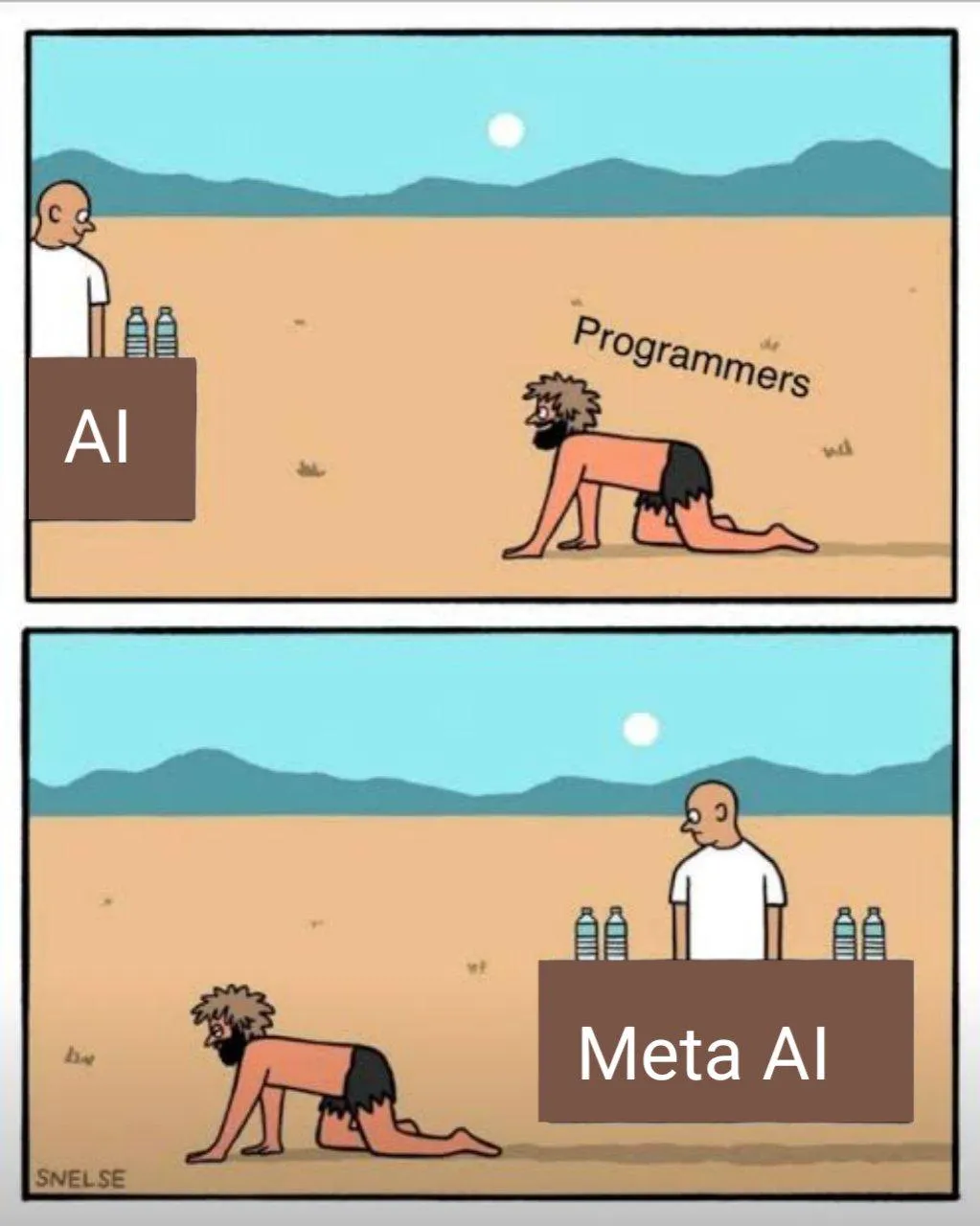
But the point is: the feed is getting more and more saturated, and more and more people are producing with the same tools and the same prompts. In this noise, the only way to keep up is to optimise and automate yourself, while building on your own data, your own voice and your own recipes, not on the first prompt.
So when I designed the content factory, I needed tools that:
- can produce images and video, from our own content too,
- are significantly better quality than the tools everyone can easily get,
- can be controlled well from code,
- and are relatively cheap (no paying for interfaces and convenience features that Claude already replaces).
Since I’ve barely opened Figma for almost half a year, I could replace both it and Higgsfield right away with fal.ai, which gives me access to hundreds of AI models from code. So instead of two fairly expensive subscriptions, I pay for one credit-based service. The finished creatives of a campaign look like this in my own content library:

But at the centre of the production line isn’t the image generator, it’s Trello. With us, every piece of content is born as a card, and the list the card is in tells the system what to do with it.
A card gets onto the board in three ways:
- We add it from a template card: topic or question, main product, format, platform, keyword, media, and a note if needed.
- From the monthly plan: when I approve the month’s plan on the dashboard, the dashboard itself creates the cards for the newsletters, blog posts and social posts, along with the coupon codes.
- The system on its own: when a new product appears in Shopify, it creates a launch card. Every published blog post gets a social card. When I upload a video to Shopify, it becomes a card on Friday. And on Friday it picks a proven video from the rotation library for the empty posting days of the next week.
After that, the card moves from list to list:
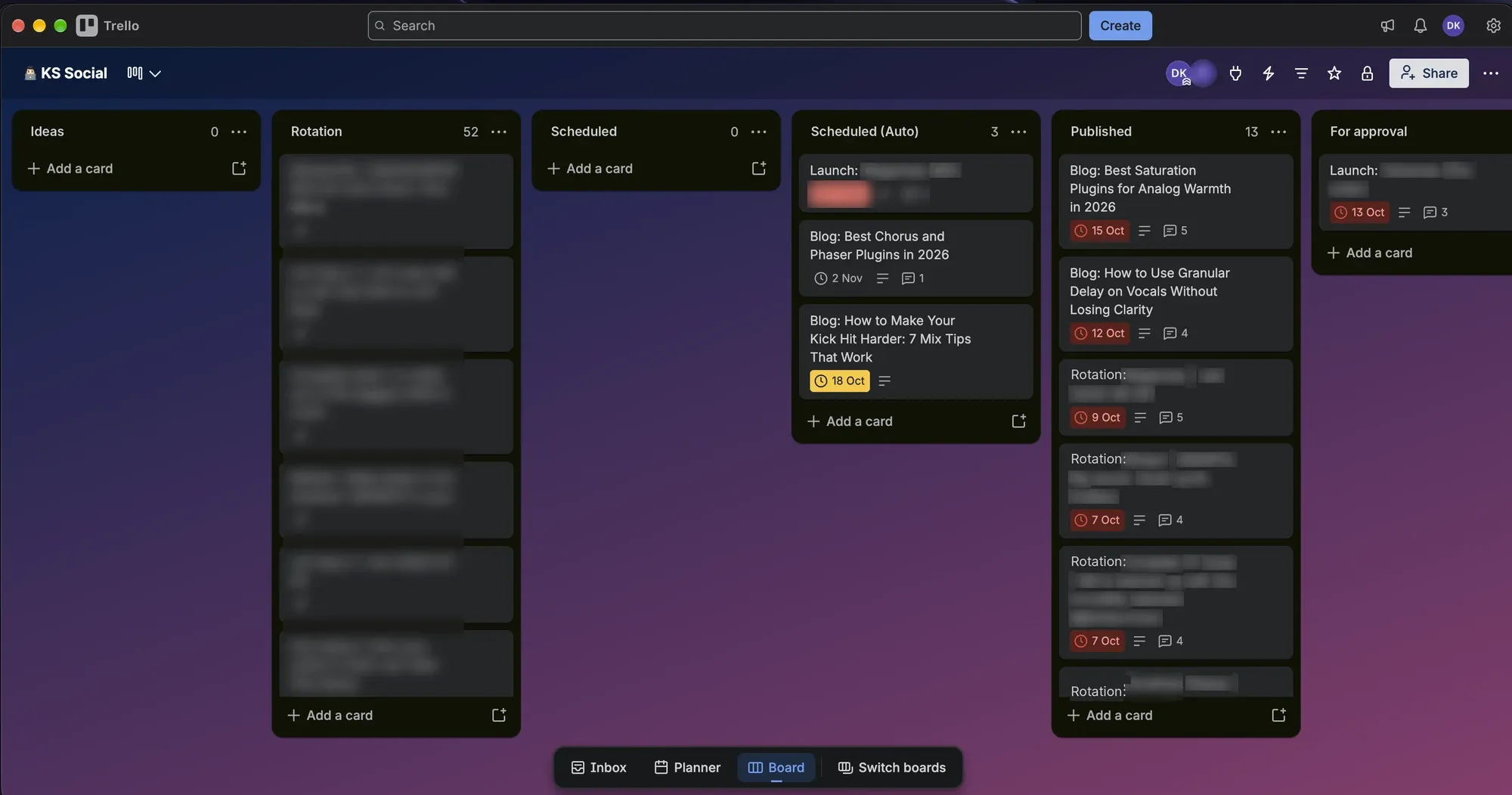
- Ideas: they just collect here, the system doesn’t touch them.
- Scheduled: the due date is the publishing day. That morning (2 days earlier for social posts) the routine writes the content, loads it as a draft (the article into Shopify, the post into Metricool), and moves the card to For approval, with the full text and the preview in a comment.
- For approval: I read it. If it’s good, I drag it to Go, and it goes live the next morning. If not, I write what’s wrong in a comment, drag it to Fix, and it comes back rewritten the next morning.
- Scheduled (Auto): whatever can go out without approval. It writes it and publishes it straight away. The rotation posts and the social posts for blog articles run here too.
- Published: what has actually gone out, with its link on the card.
Only a human can put a card into Go or Fix. That’s the system’s only gate, and it’s that way on purpose. The whole process in one diagram looks like this:
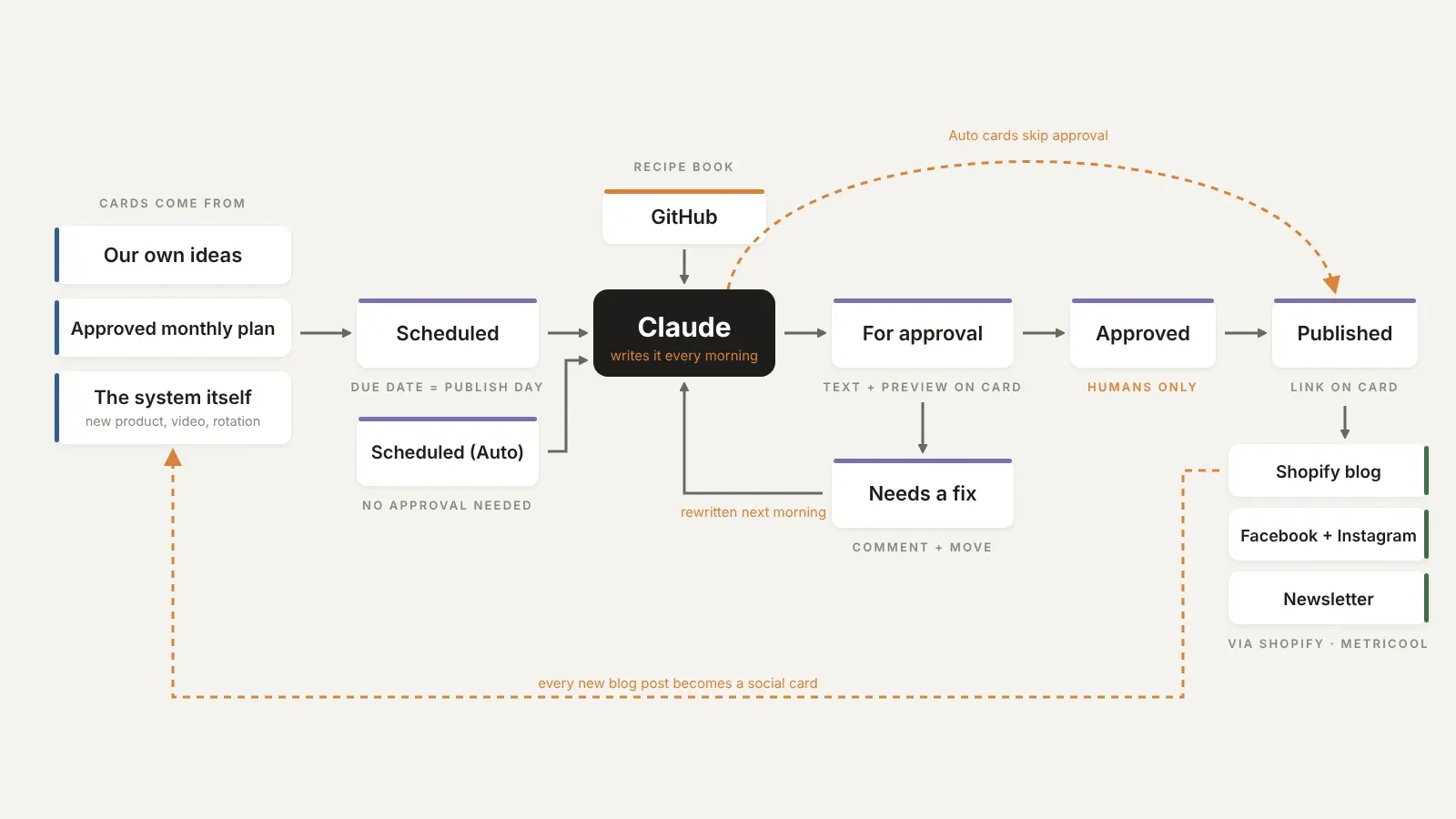
Who does what in the line:
- Trello: the queue and the approval. It’s the only interface I touch every day.
- The GitHub recipe book: the voice, the banned words, the honesty rules, the channel guides and the steps. Every run starts with it.
- Claude Code routines in the cloud: the blog and social run every day, the report weekly, the monthly plan once a month, and tracking and adjusting the plan daily.
- Webshop: all product data, prices, product images and videos come from here, and the blog posts go out here.
- Metricool: it schedules and publishes the posts to Facebook and Instagram. The 20 posts a month on the free plan is plenty for 2 posting days a week.
- fal.ai: it generates backgrounds for the ads. The creative itself is an HTML template, so the final image can be re-rendered at any time. The plugin interface is always a real product image, the logo is always the original file, and the generated image has no text, interface or people in it.
- The dashboard: this is where I approve the monthly plan and the proposals, and where I review and edit the newsletters.
And how it reaches the audience:
- Blog post: it goes live on the Shopify blog the morning after approval, and with that the social board gets a card too. The post about the article goes out on the next free Monday or Thursday, without approval.
- Social post: it waits in Metricool, scheduled live, and goes out at the set time or the best time according to Metricool. The next morning the card moves to Published with the post’s link. If there’s no fresh content for a day, a proven video goes out again with new copy, but the same one at most every 12 weeks.
- Newsletter: it waits on the dashboard as finished HTML, where I can still edit it, and from there it goes into Shopify Email.
A newsletter waits for approval on the dashboard like this:
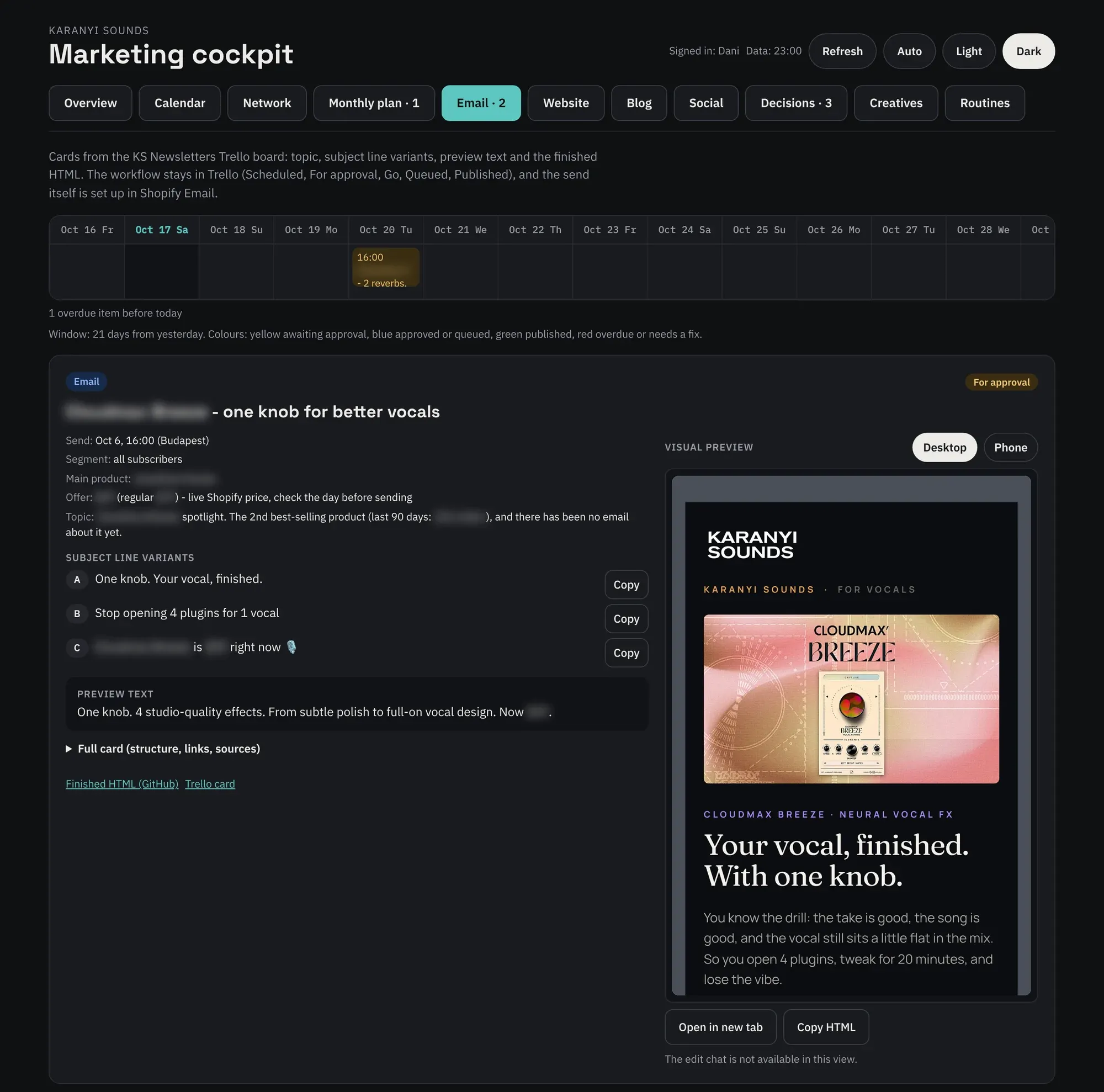
The Trello card becomes a finished email: subject line variants, preview text and a live preview in desktop and phone view. I can still edit it here before it goes out.
All I see of this is a few cards waiting in Trello in the morning. The line does the rest.
What is a system like this good for?
For me, a system like this has replaced a large part of the marketing work, mainly in social, newsletters, SEO, the blog and webshop management.
But what it’s best at is cutting the internal noise: a pile of weekly meetings that become unnecessary, the back-and-forth, and tasks being passed around.
It simply frees up time to focus on the work that matters. It also helps us see the real problems and gaps more clearly, because almost anything can be tested live, quickly, cheaply and easily, and changed right away if needed.
What isn’t it good for?
Every system is worth exactly as much as we expect from it. It won’t think for us or make better decisions, let alone do what it was designed for better than the competition. It’s also no good as a source of inspiration: if it writes a 4-line headline for a PPC ad, don’t believe it’ll be better, rather spend more time working on the recipe so it’s more precise next time. And don’t give up after the third bad result either, because in most cases a system like this gives bad results when we gave it bad instructions or not enough context.
Critical thinking and a sense of style won’t develop on their own, and a system like this won’t develop itself in that respect either. That’s why it was important to me to use it specifically, within clear limits, for what I already know, what I’m good at, and what everyone on the team has done plenty of times but doesn’t want to waste that much time on every day or every week.
The quality of the system doesn’t just come from how it’s built, but from the content planning and production skills and from fine-tuning them continuously.
The result
Even a few months ago I couldn’t have imagined replacing even a single sub-task with a system like this, let alone with AI. Today I use it in two companies. There are months of planning and fine-tuning in it, but it currently does the work of a marketing team of at least 3-4 people, including the designers and the analysts.
In an organisation, people should always be doing meaningful work. The 3-4 people who can be freed up here can take on higher-level work in the company, which is why I think it’s critically important to replace everything that can be automated or has become routine with custom systems like this, built for the company.
The marketing assistant who used to write the memos and brief the developer and the designer after every meeting could now really work on marketing problems holistically: making the monthly posts more effective, raising conversions, finding new marketing tools, instead of producing them by hand.
The designer who used to put together the images for the ads and make the variations could now really work on custom video production, experiment with interactive graphics, and so on.
It’s time for everyone on the team to step up a few levels and build a modern marketing system.
Or wait while the market rushes past them faster than the wind.